A new-generation event management platform
All your events — in one digital space
Forget the dozens of chats, scattered files and spreadsheets. BigDaySpace is the single platform where you create, organize and share your event.
⭐ 500+ organizers already trust BigDaySpace with their most important days
No credit card. Ready in 5 minutes.

Built for any kind of event
Does this sound familiar?
Chat chaos
Dozens of messages across Telegram and WhatsApp — and no one remembers what's happening where.
Details scattered everywhere
Event info spread across Google Docs, spreadsheets and notes apps.
The same questions, over and over
Guests keep asking: «Where's the venue? What time? What should I bring? Who else is coming?»
Organizer burnout
Tired of being the «dispatcher» and «nanny» for grown adults.
Duplicate gifts
Three guests bring the same gift — because there was no shared wishlist.
Panic instead of anticipation
The night before the event — panic instead of excitement: «Did I share everything? Does everyone know?»
Your events deserve order, not chaos.
BigDaySpace — your personal event HQ
One link — all the info. One space — for organizer and guests. No extra tools.
Before. Chaos of 7 different tools

After · 1 event page

All the info in one place
Date, venue, schedule, contacts.
Guests always in the loop
No more repeat questions.
Ready in 5 minutes
No designer or developer needed.
Everything you need for the perfect event
The tools that most often rescue organizers — right on the event page. And there's more.

Personal event page
Build a branded event page in minutes. It looks professional and captures the vibe of your event — no designer, no Canva required.
- Templates for weddings, birthdays, conferences and corporate events
- Custom photos, colors, fonts and background music
- Unique URL like bigday.space/your-event
- Looks great on phone, tablet and desktop
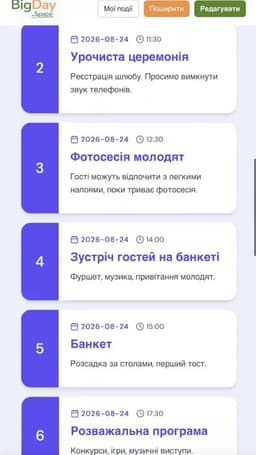
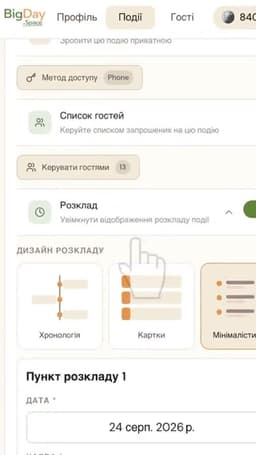
Schedule & timeline
Publish a detailed day-of timeline. Guests always know where to be, when, and what's next — without flooding your chat.
- Chronological timeline with time and description for every item
- Location and directions for each part of the event
- Push reminders sent to guests 30 min before each item
- Instant edits — guests see updates in real time
Guest management (RSVP)
Guest list, RSVPs, contact info — all in one place. No guest signup required, no chaotic group chats.
- One-tap RSVP — no guest account required
- Real-time list of confirmed and declined guests
- Plus-ones: guests add companions with names
- One-click export to CSV / Google Sheets
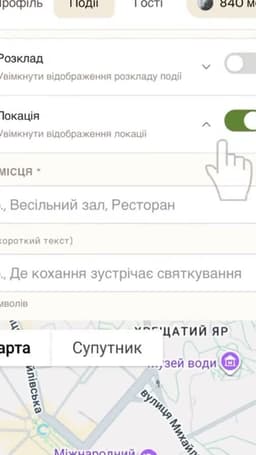
Location & directions
Interactive map, one-tap directions, venue photos and transport tips — your guests will never get lost.
- Google Maps or Apple Maps in one tap — device-aware
- Photos of the entrance and interior so guests find the door
- One-tap Uber or Bolt request with coordinates prefilled
- Nearest metro, parking, bus stops
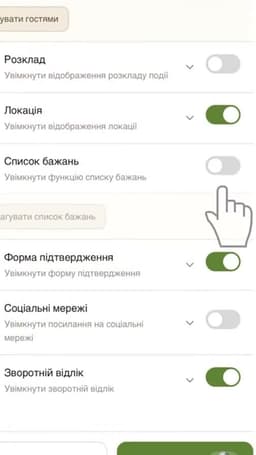
Gift wishlist
Add wished gifts with links. Guests reserve — others see the status, and no one buys the same thing twice.
- Add links to specific products or general wishes
- Guests reserve a gift — everyone sees it's taken instantly
- Group-purchase: multiple people chip in for one large gift
- Privacy: gifter names hidden until the event day
For everyone who hosts unforgettable moments
For personal events
- Couples planning their dream wedding
- Hosts of birthdays and anniversaries
- Anyone who wants to welcome guests in style
For business & agencies
- Event agencies and planners
- HR teams and corporate events
- Organizers of conferences, festivals and brand events
For guests
- One invitation — all the info
- Nothing gets lost
- Easy to RSVP and pick a gift
Get started in 3 simple steps
Create your page
Choose a template and fill in your event details.
Customize everything
Add photos, RSVP, schedule, and your personal touch.
Share with guests
Send a link or share on social — guests see it instantly.
What organizers say
“BigDaySpace completely replaced our Telegram chat and Google Docs. Guests were thrilled — everything is neat, beautiful and clear. I finally stopped answering «where and when».”
“We moved all our corporate events to BigDaySpace. Now we have a single standard for clients — and they appreciate it. Prep time is cut in half.”
“Organizing a corporate event for 200 people is always stressful. BigDaySpace made the process simple and clear. Recommended for anyone who wants order, not chaos.”
Your data — safely protected
BigDaySpace is built so that personal details of organizers and guests stay private, visible only to those you've allowed.
Private events
Access only for invited guests — the page is not indexed without your permission.
Access control
You decide who sees the event. Sign-in via email or phone.
Data protection
Contact details are stored in a secure environment and never shared with third parties.
You're the owner
Full control over event info. Delete or edit at any time.
Answers to your questions
How long does it take to create an event?
A basic event page is ready in 3 minutes. If you add schedule, locations and wishlist — about 20–30 minutes.
Will strangers see my event?
No. You choose — public or private. A private event is only accessible to the people you sent the link to.
Is BigDaySpace suitable for corporate events?
Yes. We offer a B2B plan with extended features for agencies, HR teams and organizers of large events.
How do guests RSVP?
Via the built-in RSVP form. You get a list of confirmed guests in real time.
Can I use my own design?
Yes, on the Pro plan. Upload your own cover photo or video, customize colors and fonts.
What happens to data after the event ends?
It stays in your account. You can delete the event or keep it as an archive of memories.